Introductiom
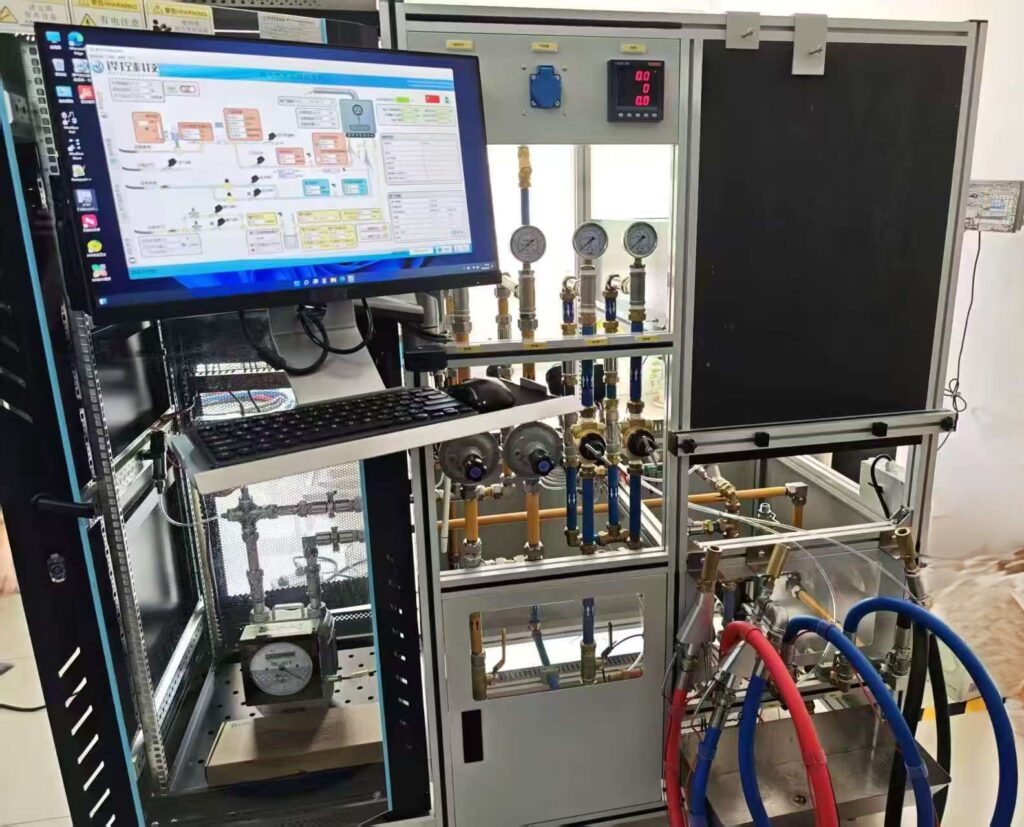
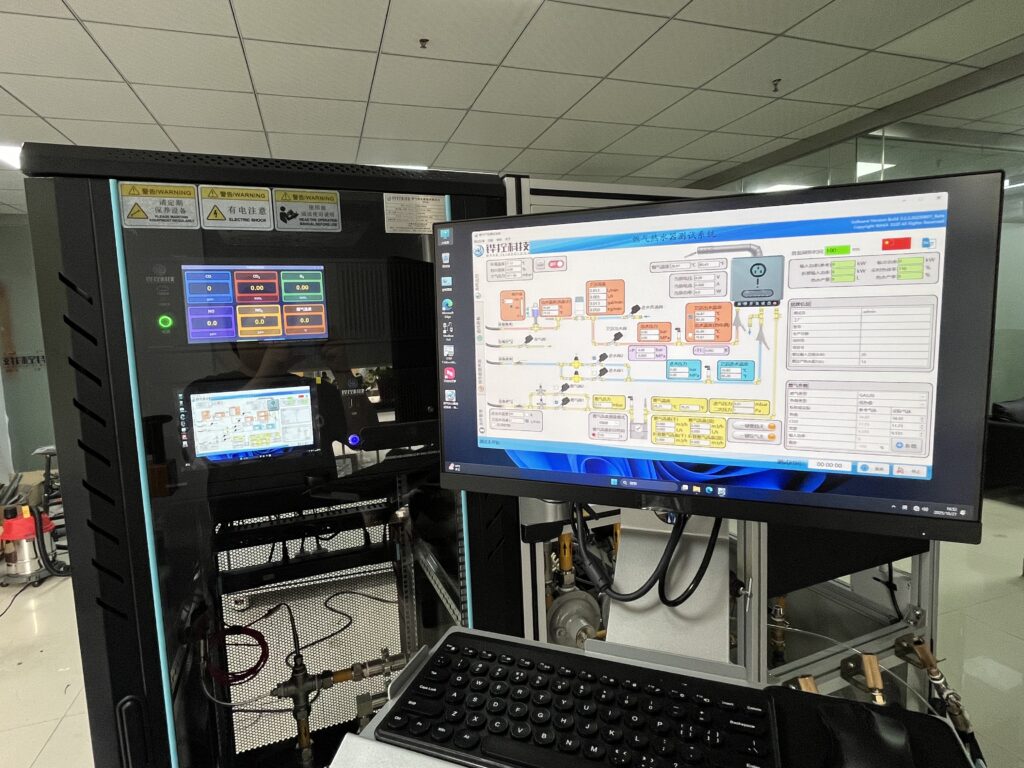
This gas water heater detection equipment adopts a computer centralized distributed measurement and control system. The overall system mainly consists of an industrial control computer, a data acquisition board, and various types of sensors. The data acquisition board collects sensor signals, processes them, and returns them to the industrial control computer. The upper computer software of the industrial control computer is installed to process and calculate the data and implement it.
This gas water heater detection equipment is divided into two parts in terms of hardware: one is the equipment rack and pipeline, and the other is the electrical control system.
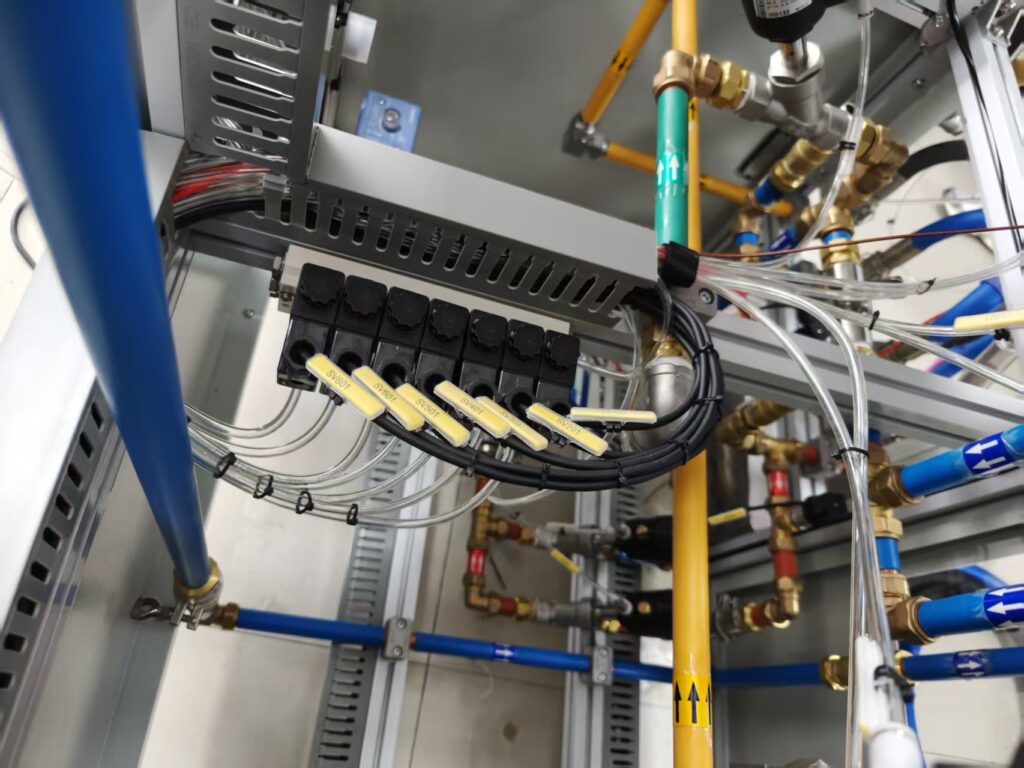
Adopting a combination of manual and automatic control, ball valves are installed on the main inlet pipe and main inlet pipeline, which are normally in a normally open state. In case of abnormal situations, manual intervention can be carried out to cut off water and gas to ensure safety. Other normally tested pipelines are equipped with solenoid valves, which can be controlled by the electrical control system to control the on/off of water and gas.
The hardware acquisition and control of the current model gas water heater detection system meet the energy efficiency level testing and some routine tests, including GB6932, EN26, EN13203-2&Regulation 812, 814 (European standard ERP), 10CFR Pt.430 Subpt. B APP. E (American standard DOE), AS5263.1.2 (Australian standard).
The current model supports pre adjusted water flow functions in both hardware and software, including ERP and DOE testing, making the testing process more accurate.
Project Introduction
Based on the design of the brand-new test bench frame, the overall dimensions can cover the water and air source pipelines at the placement station, and the comes with a built-in mounting backplate. The entire test system operates in automatic/manual mode, namely automatic/manual operation of water and air switches; automatic centralized data and display, as well as real-time calculation of results; automatic execution of the test program according to the test methods in the execution standards; automatic report generation and saving. The standard program is shown in Table 1:
Table 1: Standard Test Procedure
| No. | Standard | Test function |
| 1 | GB6932-2015 | 100% thermal load thermal efficiency test 100% thermal load test 100% thermal load hot water production rate |
| 2 | EN26-2015 | 100% thermal load thermal efficiency test 100% thermal load test |
| 3 | 10CFR Pt.430 Subpt.B APP.E (US Standard) – 2022 | DOE 24h energy efficiency test |
| 4 | Internal customer;Customer internal | Constant temperature performance test (user-provided water heater panel supporting communication) |
| 5 | / | Air blowing function; Air blow feature |
| 6 | / | Report summary save;Save report summary |
| 7 | / | History report query;Historical report query |
Equipment design; Device design
This water heater testing system adopts a computer-based centralized distributed measurement and control system. The overall system mainly consists of an industrial control motherboard, a touch display data acquisition boards, and various types of sensors. The data acquisition boards collect the sensor signals, process the data, and return it to the industrial control computer
Hardware functional design
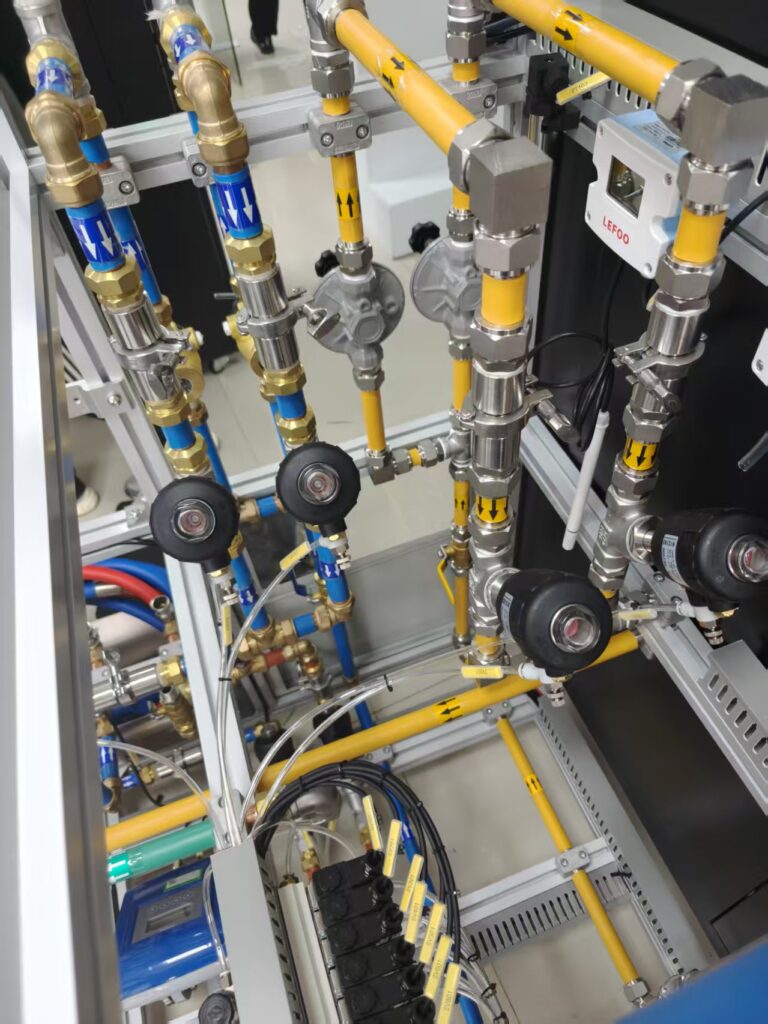
This water heater test rig is divided into two main parts in terms of hardware: one part consists of the equipment frame and piping, and the other is electrical control system, with overall dimensions of 1700*750*1800mm ; in terms of piping design, combination of manual and automatic control is adopted, with ball valves installed on the main water inlet and gas inlet pipes (normally open), which are used for manual intervention to shut off water gas in case of abnormal situations to ensure safety; other piping for normal testing is equipped with solenoid valves/angle seat valves, which can be used to control the on/off of water gas through the electrical control system. For detailed design specifications, please refer to the 3D design drawings after Table 3. Table 3 lists the required hardware
Table 3: Added Hardware List;Add hardware list to Table 3
| No. | Name | Specification | Quantity | Brand |
| 1 | Gas temperature sensor | 0~100℃ PT100±0.1℃ Diameter: 3mm Display accuracy: 0.01℃ | 1 | WAKA Customization |
| 2 | Gas pressure sensor | 0~7kPa 0.075% FS Display accuracy: 0.01kPa | 1 | WAKA Customization |
| 3 | A single pressure sensor | 0~7kPa 0.075% FS Display accuracy: 0.01kPa | 1 | WAKA Customization |
| 4 | Secondary Pressure Sensor | 0~2000Pa 0.075% FS Display accuracy: 1Pa | 1 | WAKA Customization |
| 5 | Gas angle valve | DN20 | 1 | CHISIN |
| 6 | Gas pressure regulating valve | 0.5~50mbar | 1 | Aichi |
| 7 | Inlet and outlet water temperature sensor | 0~100℃ PT100±0.1℃ Diameter: 3mm Display accuracy: 0.01℃ | 2 | WAKA Customization |
| 8 | Outlet water temperature sensor | 0~100℃ T-type ±0.5℃ Diameter: 3mm (exposed tip) Display accuracy: 0.℃ | 1 | WAKA Customization |
| 9 | Inlet and outlet water pressure sensors | 0~1.6MPa 0.5% FS Display accuracy: 0.01MPa | 2 | WAKA Customization |
| 10 | Bypass balancing valve | DN20 | 1 | Emeco |
| 11 | Copper printed connector | / | 3 | WAKA Customization |
| 12 | Specialized Temperature Measurement Connector | DN15 | 2 | WAKA Customization |
| 13 | Specialized pressure testing adapter | DN20 | 1 | WAKA Customization |
| 14 | Inlet and Outlet Angle Valve | DN20 | 3 | CHISIN |
| 15 | Bypass Angle Seat Valve | DN20 | 1 | CHISIN |
| 16 | Blowdown angle seat valve | DN20 | 1 | CHISIN |
| 17 | Water inlet pressure regulating valve | 0.07~1.7MPa | 2 | Noguan |
| 18 | Water proportional valve | / | 1 | Siemens |
| 19 | Pneumatic solenoid valve (with base) | 24V | 7 | Aideke |
| 20 | monitor | 23.5 inches | 1 | HP |
| 21 | Atmospheric pressure sensor | 80~110kPa 0.2% FS Display accuracy: 0.01kPa | 1 | WAKA Customization |
| 22 | First-stage two-component | / | 1 | Aideke |
| 23 | Secondary double-joint | / | 1 | Aideke |
| 24 | electricity meter | / | 1 | Qingzhi |
| 25 | Ambient temperature and humidity sensor | Humidity: 0~100% Temperature: 0~50℃ | 1 | LEFOO |
| 26 | Industrial computer | Industrial control motherboard 16G DDR4 512G SSD (expandable Bluetooth and WIFI modules) | 1 | ELSKY |
| 27 | PLC | CPU | 1 | WAKA Customization |
| 28 | PLC | 8 AI Analog Input Module | 1 | WAKA Customization |
| 29 | PLC | 4 TC thermocouple input module | 1 | WAKA Customization |
| 30 | PLC | 2AI/1AO Analog Input/Output Module | 1 | WAKA Customization |
| 31 | Data acquisition module | 6RTD resistance temperature detector input module | 1 | ZEAL TECH |
| 32 | aviation plug | / | 27 | WAKA Customization |
| 33 | Electrical control box | 4U | 1 | WAKA Customization |
| 34 | Electrical cabinet | Length, width and height: 600*800*1600mm | 1 | WAKA Customization |
| 35 | ball valve | Stainless steel/brass | 8 | High-quality domestic product |
| 36 | Smoke exhaust temperature sensor | 0~450℃ T-type ±0.5℃ Diameter: 1.5mm Display accuracy: 0.1℃ | 1 | WAKA Customization |
| 37 | Variable frequency power supply | Power: 1000W Others: RS232 communication | 1 | AIP |
| 38 | Aluminum profile frame | 40*40mm | 1 | WAKA Customization |
| 39 | Sink | / | 1 | WAKA Customization |
| 40 | seal the board | baked paint | 1 | WAKA Customization |
| 41 | sheet metal | Zero cold water coil placement (base cover) | 1 | WAKA Customization |
| 42 | backplane | Black matte paint European standard thermocouple hole | 1 | WAKA Customization |
| 43 | water inlet hose | DN20 blue/1.5m | 2 | WAKA Customization |
| 44 | water outlet hose | DN20 red/1.5m | 1 | WAKA Customization |
| 45 | air intake hose | DN20 black/1.5m | 1 | WAKA Customization |
| 46 | Main water inlet hose | DN25 blue/3m | 1 | WAKA Customization |
| 47 | Main intake hose | DN25 black/3m | 1 | WAKA Customization |
Design rendering; Design effect drawing
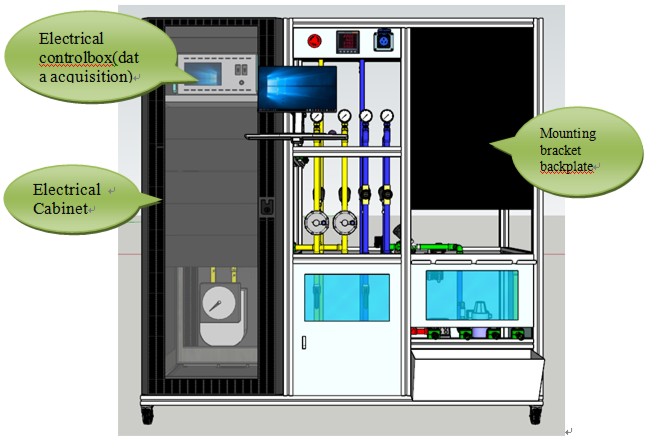
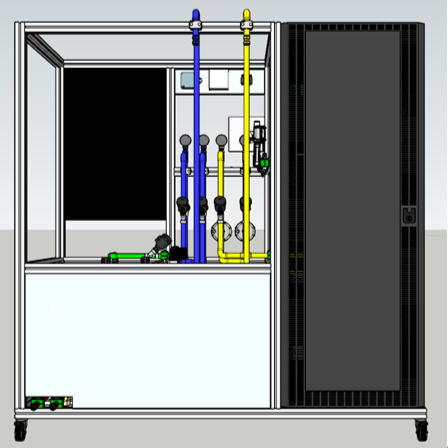
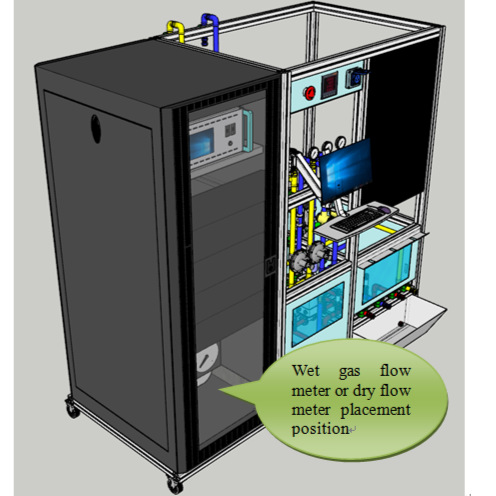
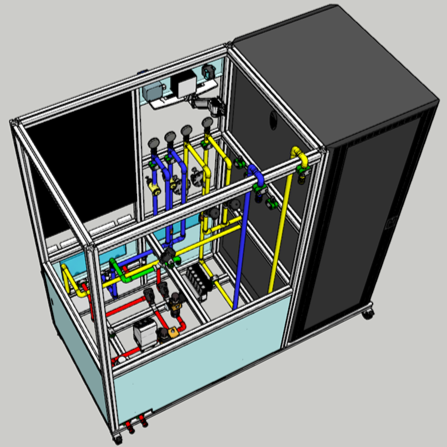
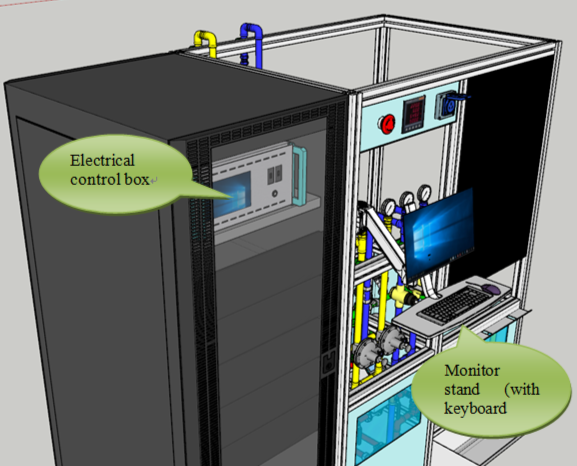
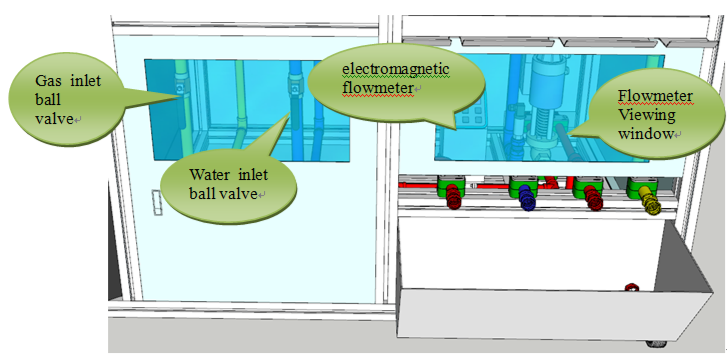
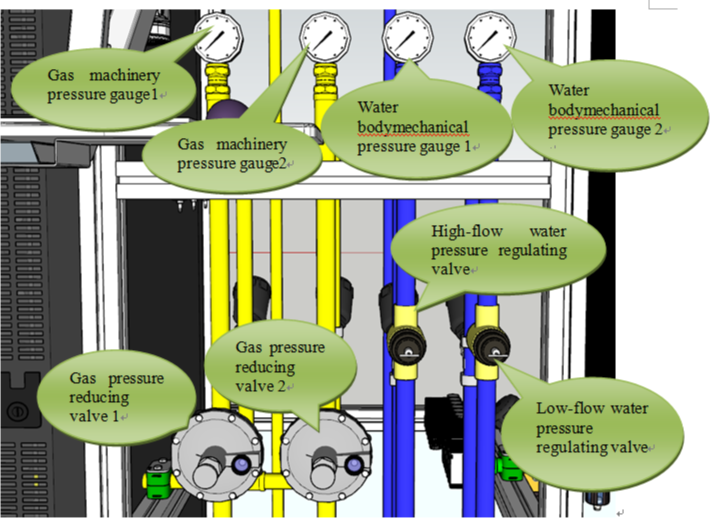
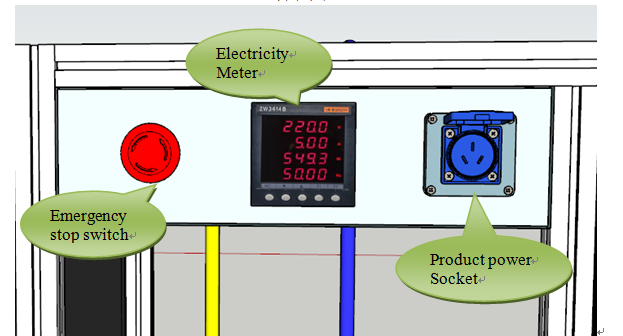
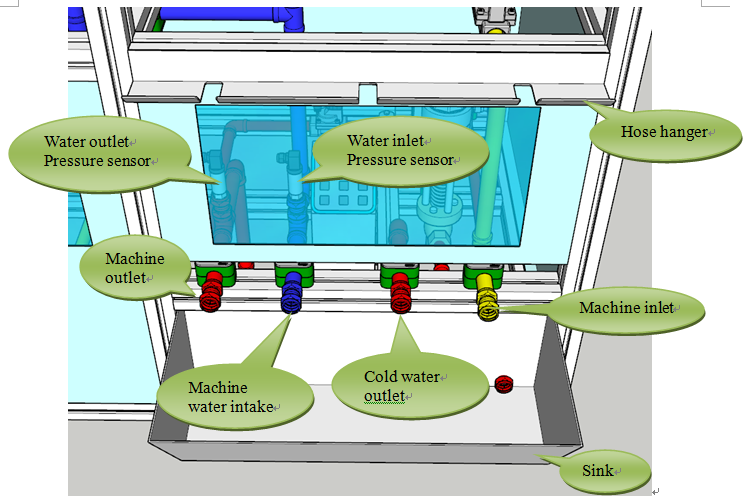
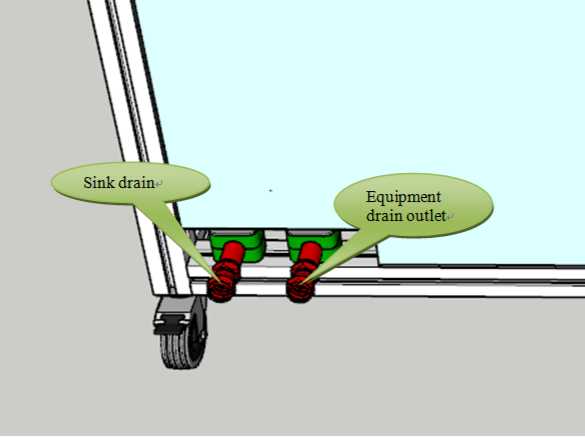
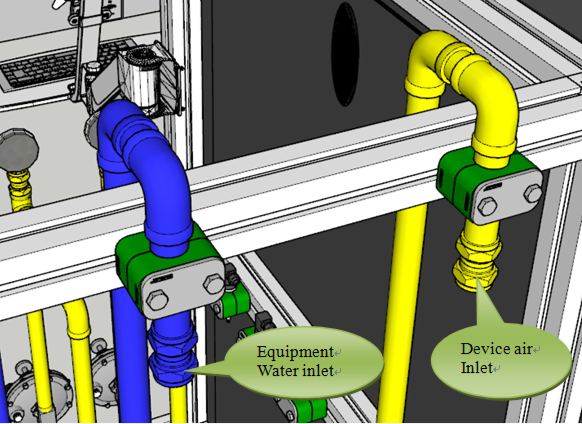
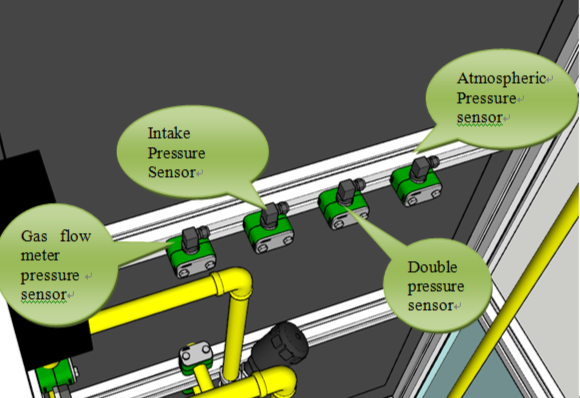
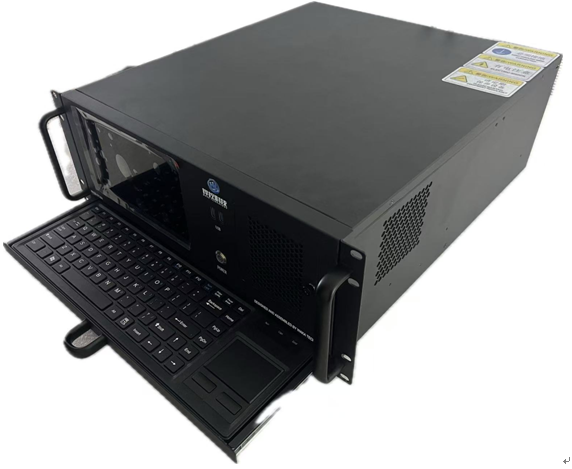
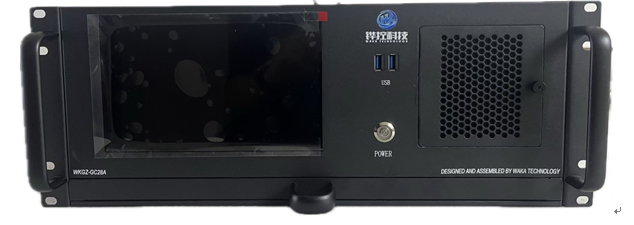
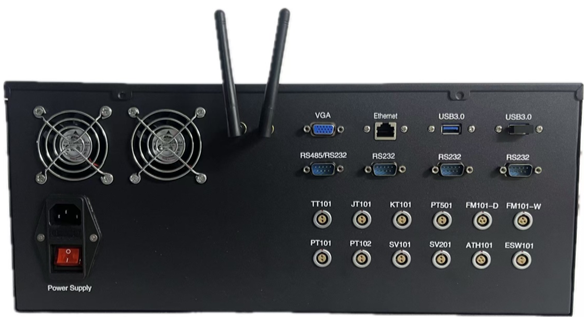
Physical photo of integrated electronic control cabinet
Software Functional Design
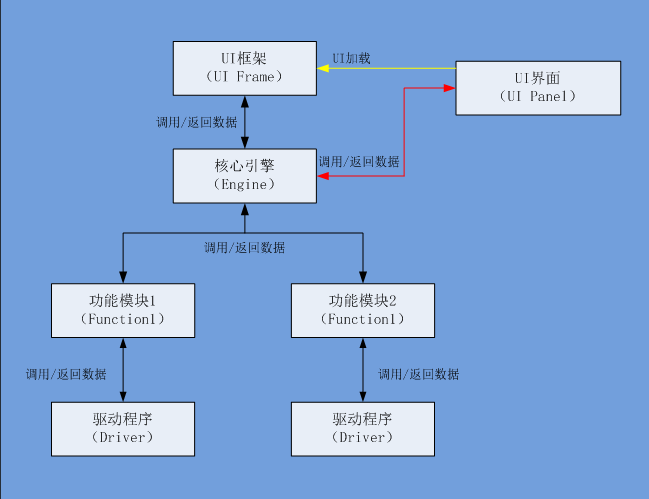
The overall design concept of this software is to use the engine layer as the central hub, with data interaction between the upper UI and lower drivers uniformly managed through the engine layer. The platform architecture is shown in the figure below:
Communications and Environment:
1. Communication method between host computer software and PLC module: (TCP communication method, TCP/IP protocol); 2. Host computer development environment: Lab 2018; 3. Software authorization function: provided in the form of a registration code; 4. Dependent database: Access 2007 or above 5. Dependent environment: .net Framework, Labview RT 2018; 6. Computer CPU: Core i3 or above; 7. Computer memory 4G or above; 8. Computer hard disk: 80G or above
The overall operational process is:
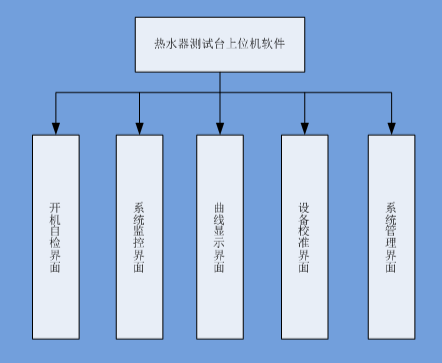
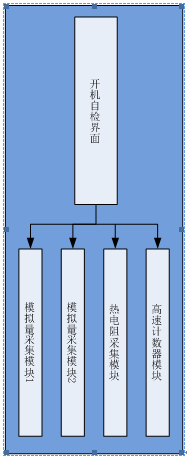
1. Run the software, the login interface pops up, enter the login account and password, check for errors. If there are no errors, to the login log and proceed to the next step; if there are errors, check if the error count has reached 3. If not, you can continue to enter; if has, exit the software; 2. Start the engine program and load various UI interfaces; 3. The engine starts various functional modules; 4. Each functional module starts own driver program and executes its respective functions; 5. When an exit software command is received from the upper-level UI, the engine sends the command to each functional module, and each module executes the exit program; This software includes 5 functions: power-on self-test interface, system monitoring interface, curve display interface, device calibration interface, and system interface, as shown in the figure below:
Login Interface
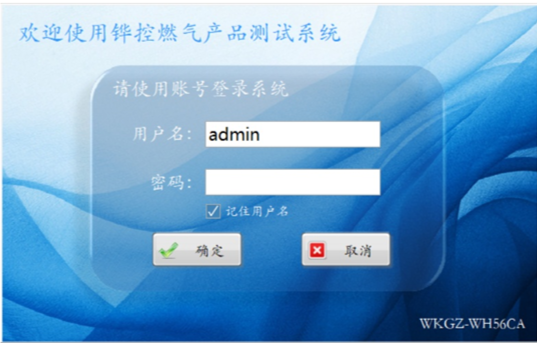
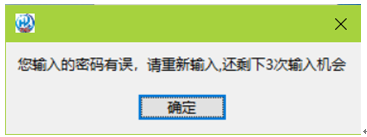
This software is designed with a permission-based access control feature, primarily divided into administrator and tester permissions, which are distinguished and restricted through the login interface. Additionally, the login information is recorded after each successful login. Under the tester permission, users only have access to the automatic testing interface, curve display interface, and data management interface. Users are allowed only 4 attempts to enter their user information correctly each time they run the software; once this limit is reached, the software will automatically exit, as shown in the figure below:
Device Power-on Self-Test
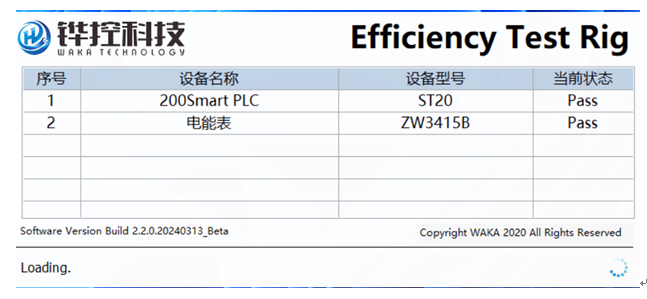
Every time the software starts, it first enters the communication self-test function for the connected instruments and controllers, which mainly includes two parts: the power meter and the PLC. Only when the communication self-test of all instruments passes can the software be normally accessed, as shown in the figure below:
System Monitoring Interface
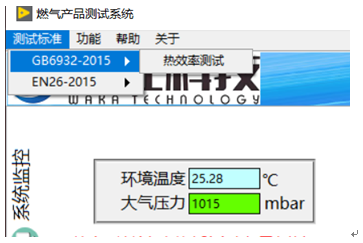
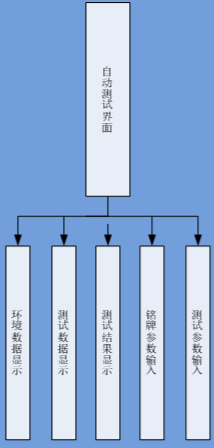
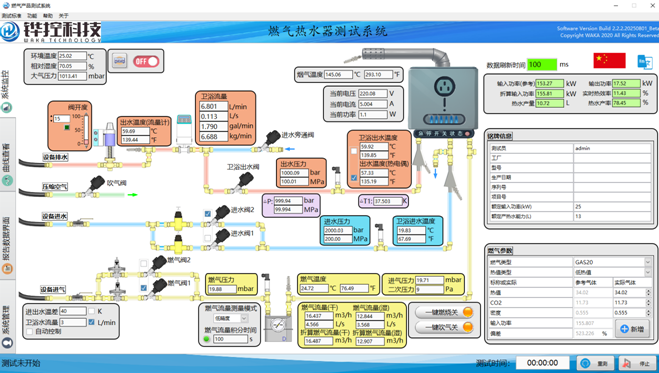
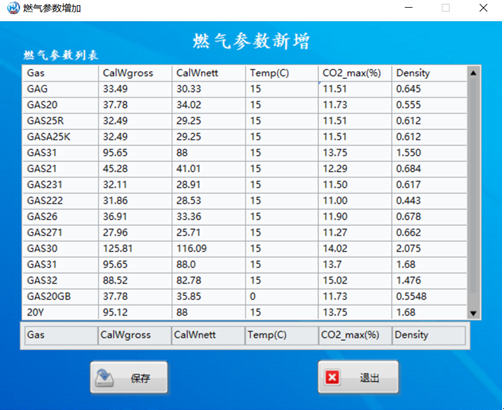
The test interface mainly includes environmental data display (ambient temperature, atmospheric pressure), test data display (inlet and outlet water temperature, inlet and outlet water pressure, water flow rate, gas pressure, primary pressure, secondary pressure, gas temperature, gas flow rate), test result display (converted input power, output power, thermal efficiency, hot water production rate), nameplate parameter input (tester, factory, model, production date, serial number, project number, rated hot water production capacity), and test parameter input (gas type, heating value type, heating value, CO2, density, rated power, deviation, add parameter button). When the user completes the gas parameter settings in the add interface, the corresponding gas parameter information will be automatically loaded after the gas type and heating value type. As shown in the figure below:
Curve Display Interface
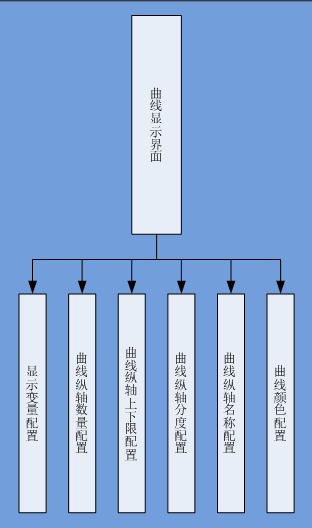
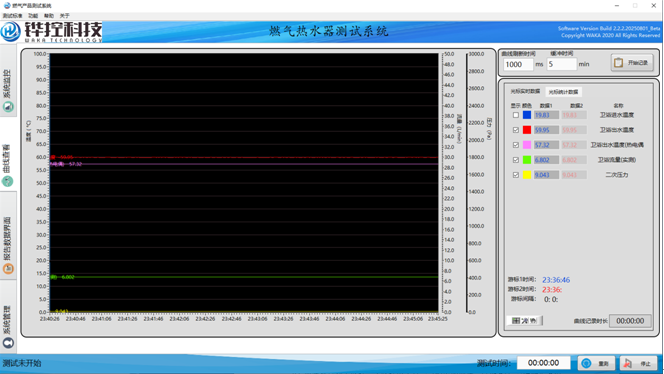
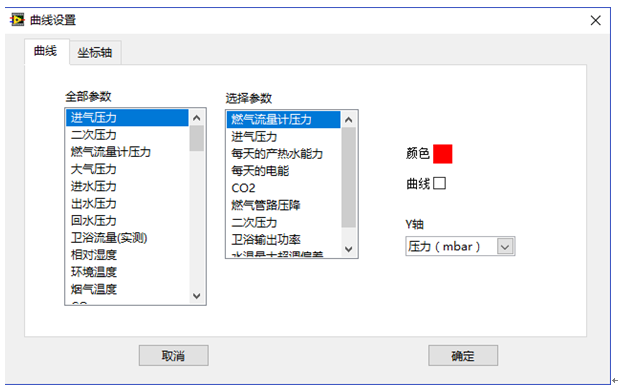
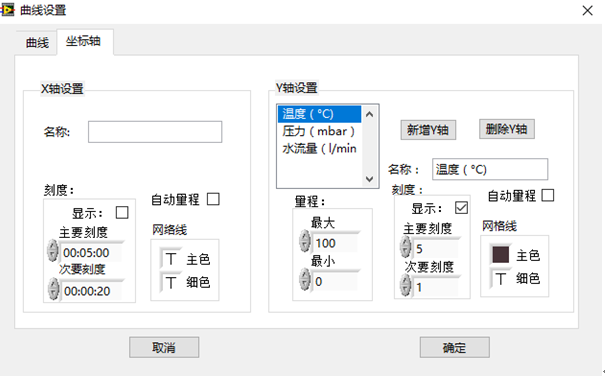
The curve display interface supports associating parameters including display variables, the number of vertical axis bars, the upper and lower limits of the vertical axis, the vertical scale, the vertical axis name, and the curve color with the current test item during the testing process. These parameters will be saved, and the configuration information from the previous test will automatically displayed the next time this test item is performed. Additionally, the buffer size for the curve data can be set. Once set, the amount of data on the X-axis always remain consistent with the buffer size, as shown in the figure below:
Data Management Interface
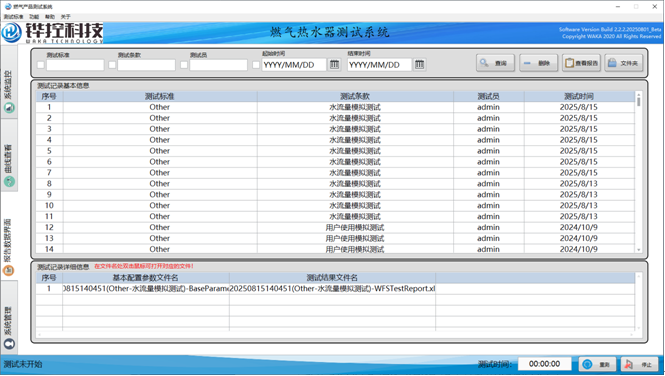
The data management interface is mainly used for saving automatic test results and provides functions to delete and query data. The corresponding database fields include inlet water temperature outlet water temperature, inlet water pressure, water flow rate, gas flow rate, primary pressure, secondary pressure, flue gas pressure, measured converted input heat load, output heat load, efficiency, hot water production rate, ambient temperature, atmospheric pressure, gas name, gas heating value type, gas reference heating value, gas measured heating value, gas reference density, measured density, tester name, test time, test item name, process data filename, etc.; data can be queried using four query conditions: test standard, test clause, tester name and test time; the data query results can be displayed in the built-in report format of Huakong, and can also be exported to a customer-specified Excel file, shown in the figure below:
Device Calibration Interface
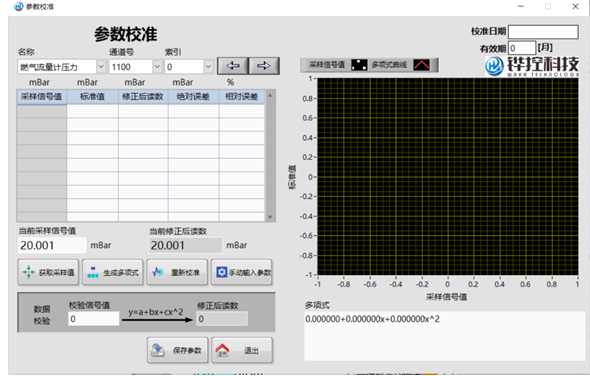
This test system adopts the least squares method in curve fitting to correct the values collected by the sensors. The formulas used are selected based on the sensor type and inherent linearity, primarily Y=a*X+b and Y=a*X^2+b*X+c. This correction method, by selecting appropriate measurement point data corrects the entire measurement range, making all points within the range infinitely close to the true values, as shown in the figure below:
System Management Interface
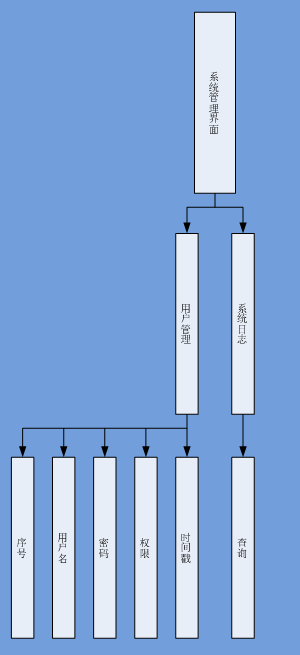
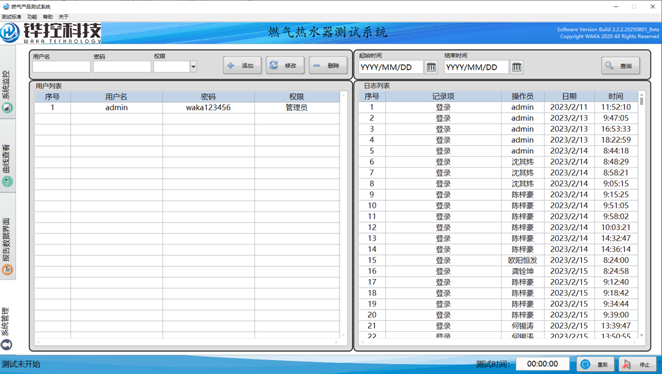
The system management interface includes user management and system log functions. The user management interface provides add, delete, modify, and query operations for user information, a corresponding database structure containing 5 fields: ID, username, password, permission, and timestamp. The software has a default superuser permission that cannot be deleted, which is to manage all user information. User permissions are divided into two levels: administrator and tester. The main difference between a tester and an administrator is that the tester cannot access the parameter settings. The system log records user behavior information, including login information, test information, etc., and provides time-range query conditions, as shown in the figure below
Automatic Test Program Functions
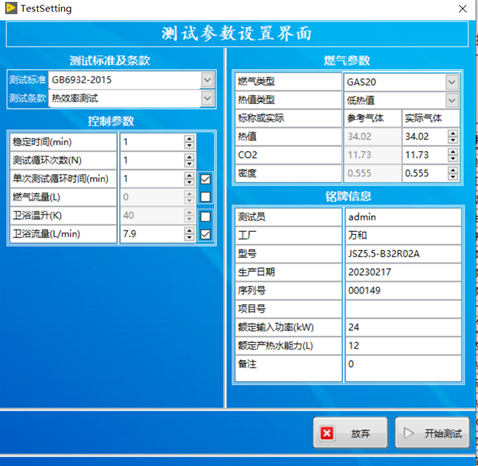
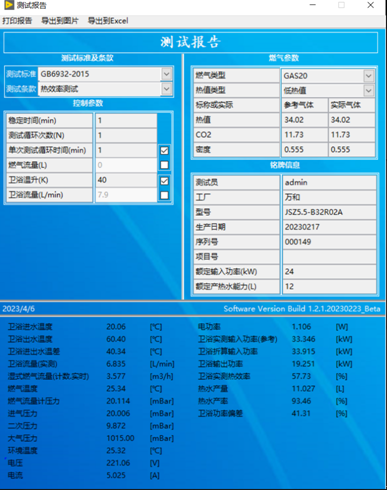
This software provides an automatic test program function. The standards cover the thermal load and thermal efficiency tests of GB6932-2015 and26-2015, as well as the water-off temperature rise and water temperature overshoot tests of GB6932-2015. Except for the manual adjustment water flow required to meet the conditions before starting the test, the entire process is fully automated. The test process includes selecting the test program, parameter setting, starting the test and recording, and popping up the report upon test completion, as shown in the figure below: